Shure SM4 For Content Creators
Disclosure: As an Amazon Associate, I earn from qualifying purchases.
Your Audio Is Ruining Good Video
Let me be blunt.
You spent hours on lighting. You framed the shot perfectly. You edited the B-roll. You even color-graded.
Then someone watches your video and the first comment is “audio sounds a little hollow” or “there’s a weird buzz in the background.”
It stings because it’s true. Viewers will forgive imperfect video way before they forgive bad audio.
So you’ve been looking at XLR microphones. You know USB mics have limits. You want something that sounds professional without requiring a soundproof booth.
Enter the Shure SM4.
This mic was designed specifically for home and office environments — exactly where most creators work. The headline feature isn’t just sound quality. It’s something arguably more important: interference rejection.
Let me explain why that matters for your workflow.
The Interference Problem Nobody Talks About
You’ve probably heard RF noise before. That subtle clicking, buzzing, or static that appears when your phone checks for email or your laptop’s Wi-Fi scans for networks.
Most microphones — including some pretty expensive ones — are terrible at blocking this. The noise gets into the signal chain and suddenly your clean voiceover take is trash.
Shure filed a patent on a new shielding technology for the SM4. It’s not marketing fluff. I tested this mic with an active phone literally touching the grille. My wireless mouse receiver six inches away. My router on the same desk.
Dead quiet.
For a creator who records in a home office with multiple devices running — that’s a production timesaver. No more re-takes because you forgot to put your phone in the other room. No more denoising plugins that degrade the vocal quality.
The SM4 just works.
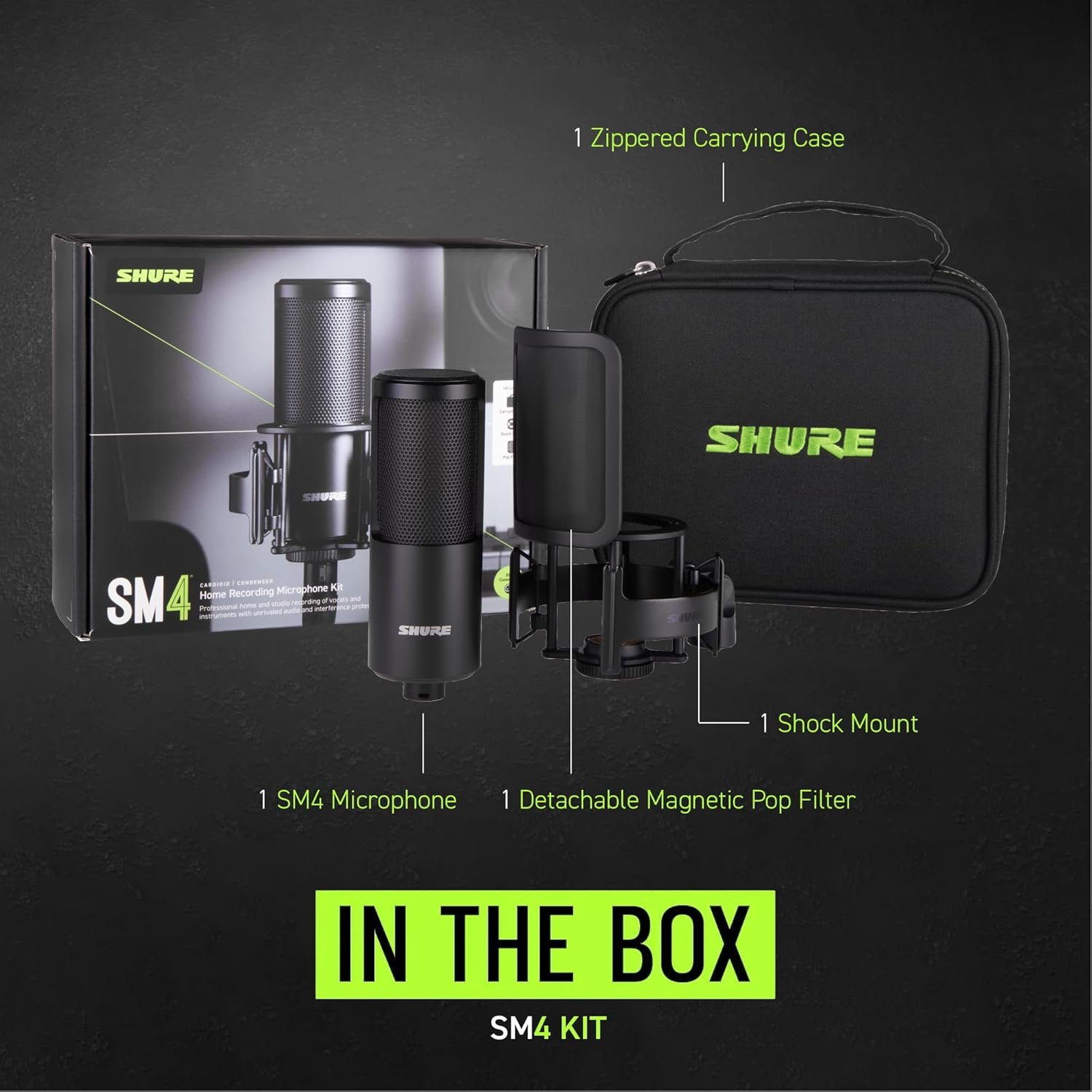
What You Actually Get In The Box
Shure keeps this simple.
Included:
- SM4 condenser microphone (all-metal body)
- Shock mount (reduces desk thumps and stand vibrations)
- Magnetic pop filter (snaps on, no adjustment fiddling)
Not included (you probably already own these):
- XLR cable
- Audio interface
- Mic stand or boom arm
If you’re already using an interface for other mics or instruments, you’re set. If not, budget about $100-130 for something like a Focusrite Vocaster or Universal Audio Volt. The SM4 needs phantom power, which any basic interface provides.
One nice touch: the shock mount uses a standard 5/8″ thread. It’ll screw onto virtually any boom arm you already have.
Where This Mic Fits In A Creator Workflow
Let me walk through specific use cases.
YouTube talking head videos: The SM4’s neutral sound means your voice sounds natural, not overly hyped or thin. You won’t need to EQ much in post. The low-profile design means the mic can sit just out of frame without being distracting.
Voiceover for B-roll: The RF shielding really shines here. When you’re recording VO while your editing timeline is running, monitors are on, external drives are spinning — the SM4 ignores all that electrical noise. Cleaner takes, less punching in.
Live streaming (Twitch, YouTube, Kick): You need a mic that sounds good without real-time processing. The SM4 delivers. The interference protection matters because streamers have multiple USB devices, RGB lighting, and network gear all generating noise. The shock mount also helps with keyboard thumps if you’re gaming.
Podcasting: Works great for solo shows. For two-person setups, you’d want two SM4s or a dedicated podcast interface. The cardioid pattern (unidirectional) rejects off-axis sound reasonably well, but it’s not a super-tight broadcast mic like an RE20.
Music demo recording: Songwriters will appreciate the 1″ brass capsule. Acoustic guitar, guitar amps, even soft vocal passages all sound detailed. It won’t replace a U87, but for demo quality or scratch tracks, it’s more than enough.
The Speed Factor: Setup and Tear Down
One thing creators care about that reviewers rarely mention: how fast can I get this thing working?
Here’s the real-world timeline:
- Mount to boom arm: 30 seconds
- Attach magnetic pop filter: 5 seconds
- Plug in XLR cable: 10 seconds
- Turn on phantom power: 2 seconds
Under a minute. The magnetic pop filter is especially nice because there’s no twisting or tightening. It just clicks into place and stays there.
If you’re a creator who moves between locations — home office, studio, client site — the SM4 packs easily. The all-metal build means you’re not going to break it in a backpack.
What The Sound Character Actually Is
I see a lot of reviews that say “sounds great” without explaining how it sounds. Let me be specific.
Low end: Controlled. Not boomy. If you have a naturally deep voice, the SM4 won’t make you sound like a radio announcer from the 1950s. It’s tighter than an SM7B in the low-mids.
Midrange: Present but not forward. Your voice sits nicely without fighting other elements in a mix. For voiceover that needs to cut through background music, this is helpful.
High end: Smooth, not sizzly. Some budget mics add an artificial brightness that sounds “detailed” but actually just sounds harsh. The SM4 doesn’t do that. It extends without getting brittle.
Proximity effect: If you work close to the mic (2-4 inches), you’ll get some natural bass buildup. Not excessive. Back off to 6-8 inches for a more neutral, airy sound.
Compared to a dynamic mic like the Shure SM7B, the SM4 has more detail and presence. Compared to a cheap USB condenser, it has less self-noise and way better interference rejection.
Who Should Probably Skip This
Being honest saves everyone time.
The SM4 might not be for you if:
- You only need USB connectivity. Look at the Shure MV7 or Elgato Wave:3 instead.
- Your room is extremely noisy (traffic, HVAC, roommates). A dynamic mic like the SM58 or podmic would reject more ambient sound.
- You already own a high-end LDC (like a Neumann TLM 102). The SM4 won’t be a dramatic upgrade.
- You want a heavily “colored” sound. This mic is clean. If you want vintage warmth or aggressive presence, look elsewhere.
- **Your budget is under 200total.∗∗Afterinterfaceandcable,you′recloserto350. Consider the Audio-Technica AT2020 or Rode NT-USB Mini instead.
Also worth noting: the SM4 is a condenser, so it is sensitive. If you record in an untreated concrete room with echo, you will hear that echo. That’s not the mic’s fault — it’s the room’s. Basic treatment (blankets, rugs, acoustic panels) goes a long way.
Three Real-World Tests
I ran the SM4 through some scenarios that matter to creators.
Test 1: Phone on the desk, actively receiving texts. Result: zero interference. The shielding works.
Test 2: Recording VO while exporting a video in Premiere Pro. Result: no additional noise. CPU load didn’t bleed into the audio path via electrical interference.
Test 3: Streaming with Discord, OBS, Spotify, and a web browser all open. Result: clean audio. No crackles, no dropouts, no weird grounding issues.
For context, I’ve had other mics fail test #1 completely. A $300 mic from another brand picked up cell phone noise like it was designed to. The SM4 passed easily.
Longevity and Daily Use
After a few months of regular use, here’s what I’ve noticed:
The magnetic pop filter hasn’t lost any holding strength. Still clicks firmly. The shock mount elastics are holding up — no sagging or stretching. The metal grille is dent-free despite being bumped a few times.
The finish is matte black, which doesn’t show fingerprints or dust badly. Good for on-camera use where the mic might be visible.
One minor annoyance: the pop filter can’t rotate independently of the mic body. If you prefer to sing or speak off-axis (turning your head slightly), you’ll need to rotate the whole microphone. Not a dealbreaker, but worth knowing.
The XLR connection remains tight. No intermittent signal issues.
Should You Upgrade From A USB Mic?
This is the question I get most often.
If you’re currently using a Blue Yeti, Rode NT-USB, or Elgato Wave, here’s what the SM4 + interface will give you:
- Lower noise floor (less self-noise from the electronics)
- Better RF rejection (no more phone interference)
- More natural frequency response (less of that “USB mic” sound)
- Scalability (you can add more mics, instruments, or outboard gear later)
- Durability (XLR mics generally last longer than USB mics)
What you lose: convenience. USB mics are truly plug-and-play. The SM4 requires an interface, phantom power, and understanding gain staging.
For a creator who makes a living from their voice or publishes consistently, the upgrade is worth it. For someone posting occasionally from a quiet room with no interference issues, a good USB mic might still be fine.
Frequently Asked Questions
Does the SM4 work with a GoXLR or Rodecaster? Yes. Both provide phantom power and XLR inputs. It’s a great match for those interfaces.
Can I use this for Zoom calls? You can, but you’ll need your interface to route the mic to Zoom. It’s overkill, but it works and sounds fantastic.
How does it handle loud sounds like screaming or loud singing? Maximum SPL is 140dB, which is very high. You won’t distort it with a human voice unless you’re standing next to a jet engine. No pad switch on the mic itself, but your interface likely has one.
What about plosives? The internal pop filter plus the magnetic external filter handles most “p” and “b” sounds well. Very aggressive vocalists might still want an external foam windscreen.
Is the SM4 good for recording two people on one mic? Not really. It’s cardioid, so it picks up what’s directly in front. For two people, use two mics or a dedicated stereo configuration.
The Bottom Line For Creators
The Shure SM4 solves an under-discussed problem: electronic noise in home recording environments. For YouTubers, streamers, and voiceover artists working from typical offices or bedrooms, that’s genuinely useful.
It doesn’t have the cult following of the SM7B. It’s not the cheapest option. It doesn’t have USB convenience.
What it does have is clean, reliable, interference-free audio in a rugged package that sets up in under a minute. For creators who are tired of fighting noise and just want to record, that might be exactly what you need.
Depending on your existing gear, your room, and your production volume, the SM4 could be a practical long-term addition to your kit — or it might be overkill. But if you’re ready to move past USB limitations and you record near electronics, it’s worth a serious look.
As an Amazon Associate, I earn from qualifying purchases. Thank you for supporting our work.
Check It Out!