Zoom V3 Vocal Processor
As an Amazon Associate I earn from qualifying purchases.
The Zoom V3 Vocal Processor is designed for singers who want greater control over their voice without relying entirely on computer software or a complicated rack of effects equipment.
Combining automatic vocal harmonies, pitch correction, reverb, delay, compression and creative voice effects, it brings several useful processing tools together in one compact unit.
For singing guitarists, solo performers and home-recording musicians, that combination is particularly interesting. A single vocalist can add harmony parts, adjust the character of a performance and introduce effects that would otherwise require separate equipment.
Zoom has also made the V3 approachable, with clearly labelled buttons and dedicated controls for several essential functions.
Rather than hiding everything inside menus, the unit allows musicians to select effects and adjust important settings directly.
There is more to the V3 than straightforward vocal enhancement, however. It also includes unusual effects for transforming the character of a voice, USB audio interface functionality and optional hands-free control.
Its real value depends on how these features fit into a musician’s existing equipment and performance routine.
Why it works for singing guitarists
Singing while playing guitar creates a particular challenge when using vocal effects.
A guitarist often has both hands occupied, especially during complex rhythm passages or lead sections.
Adjusting a computer screen, navigating menus or reaching across a collection of equipment is rarely convenient during a performance.
The Zoom V3 addresses part of this problem through its physical controls and straightforward effect selection.
A vocalist can prepare a sound before performing, then use the processor to add harmony, pitch correction or atmospheric effects.
For a solo acoustic performer, this can provide an interesting way of creating additional vocal depth without requiring backing singers.
A gentle harmony might be introduced during a chorus, while a restrained amount of reverb can give a dry vocal sound more space.
Someone performing with a small band could use the V3 to introduce vocal layers or occasional creative effects without expanding the equipment setup considerably.
The unit is also suitable for musicians who record at home.
Its USB audio interface functionality allows it to serve as part of a simple vocal-recording arrangement, while the onboard effects offer ways to develop sounds before or during recording.
Importantly, the V3 is primarily a vocal processor, not a combined guitar and vocal effects workstation.
A singing guitarist will still need appropriate amplification or processing for the guitar itself.
The attraction is having a dedicated piece of equipment for shaping the vocal sound while keeping the rest of the musical setup relatively familiar.
Vocal harmonies from a single microphone
One of the V3’s most appealing capabilities is its automatic harmony generation.
The processor can add up to two harmony voices alongside the original vocal, producing a three-part arrangement from one singer.
That opens up useful possibilities for musicians performing without dedicated backing vocalists.
For example, a singer might perform a melody during a verse with little processing, then add higher harmony parts when the chorus arrives.
The additional voices can help distinguish different sections of a song and create a fuller arrangement.
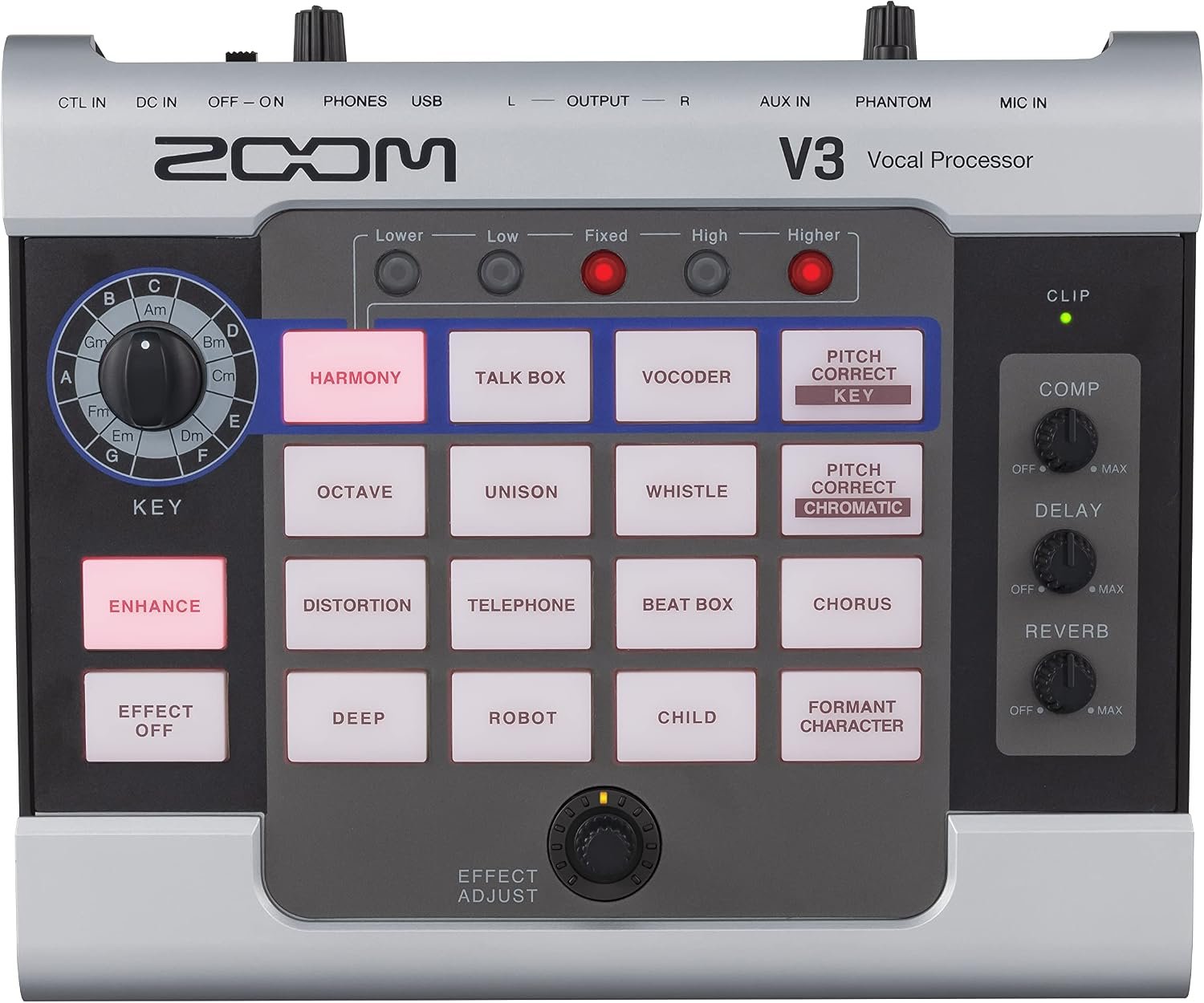
Zoom provides five harmony positions: Higher, High, Fixed, Low and Lower.
The user can activate up to two of these at the same time.
This allows different combinations of voices above or below the original melody.
The harmonies are generated according to the musical key selected on the processor.
That is an important detail.
The V3 does not automatically interpret every chord being played on a connected guitar. The musician needs to select the appropriate key and understand how the harmony intervals relate to the song.
When the settings are appropriate, the additional voices can provide convincing musical support.
However, harmony processing works best when treated as an arrangement tool rather than something that must remain active throughout every song.
A single well-chosen harmony introduced at the right moment can be more effective than constantly surrounding the lead vocal with additional voices.
For singers who enjoy arranging their own material, this feature is one of the main reasons to consider the V3.
Pitch correction for natural and creative effects
The Zoom V3 provides two main approaches to pitch correction.
Key-based pitch correction works with the musical key selected on the processor.
This allows the singer’s pitch to be guided towards notes belonging to the chosen key.
Used gently, it can help smooth small variations without necessarily making the performance sound heavily processed.
The amount of correction can be increased for a more obvious effect.
At stronger settings, the transition between notes becomes more noticeable, producing the stepped vocal character associated with certain modern electronic and pop recordings.
The V3 also includes chromatic pitch correction.
Instead of restricting corrections to a selected musical key, this mode works with semitone intervals.
Zoom recommends it for situations where the musical key is unknown or a piece contains numerous key changes.
This gives performers a useful alternative when key-based correction would be inconvenient.
It is worth understanding that pitch correction is not a replacement for controlled singing.
The processor must interpret the incoming vocal signal, and its results depend on the performance and settings.
Very inaccurate notes, unusual vocal techniques and rapid pitch movement can all make electronic correction more noticeable.
For natural acoustic performances, lighter correction may be preferable.
For electronic music, experimental arrangements or heavily processed pop vocals, the more obvious settings can become part of the intended sound.
The ability to move between these approaches gives the V3 more flexibility than a processor offering only one fixed style of correction.
Sixteen creative vocal effects
Beyond harmonies and pitch correction, the V3 includes a selection of 16 vocal effect types.
These cover both familiar vocal treatments and more dramatic sound transformations.
The Unison effect creates a doubled-vocal character by introducing slight differences in pitch and timing.
This can be useful when a singer wants a thicker vocal sound without introducing an obvious harmony interval.
The Octave effect adds a voice above or below the original pitch, creating a noticeably different tonal character.
For dramatic effects, the V3 also offers Robot, Child and Deep settings.
These alter the character of the voice in ways that would not normally be associated with natural singing.
The Vocoder and Talk Box effects offer additional electronic textures.
They can be useful for particular musical passages, introductions or experimental performances.
Other options include Distortion, Telephone, Chorus, Whistle and Beat Box.
The Telephone setting produces a restricted-frequency character reminiscent of older communications equipment, while Distortion can give a vocal a deliberately aggressive edge.
The Formant Character effect is particularly interesting because it changes the perceived character of the voice without deliberately altering the musical pitch.
This offers another way to experiment with vocal identity and texture.
The V3’s Effect Adjust control changes a relevant parameter for the selected effect.
That makes experimentation reasonably direct.
However, the 16 options are not 16 completely independent processing blocks that can all be arranged freely.
The V3 uses one selected main voice effect, alongside supporting processing such as compression, delay, reverb and Enhance.
Its design prioritises convenient access to useful vocal treatments rather than unlimited effect-chain construction.
For someone looking to expand beyond ordinary reverb and delay, the variety is welcome.
Compression, Enhance, delay and reverb
Not every useful vocal effect needs to sound dramatic.
Some of the most practical V3 features are the ones designed to improve clarity and consistency.
The built-in compressor helps control differences between quieter and louder vocal passages.
Singers naturally vary their volume throughout a performance.
A softly delivered verse may be significantly quieter than a powerful chorus.
Compression can reduce some of that difference, making it easier to maintain a more consistent vocal level.
The V3 provides a dedicated compression control, allowing the amount to be adjusted without navigating an extensive menu.
There is also an Enhance function.
Zoom designed this to improve vocal clarity by emphasising useful high-frequency information while helping control excessive sibilance.
That can be beneficial when a vocal needs to remain intelligible alongside guitar, drums and other instruments.
The delay effect introduces audible repetitions of the original sound.
Used lightly, it can provide depth or create a sense of movement.
Stronger settings produce more obvious echoes, which may be useful for selected words or dramatic passages.
The reverb effect creates a sense of acoustic space.
A small amount can help a very dry microphone signal sound more natural.
More noticeable reverb can give the impression of a larger performing environment.
The V3 provides separate knobs for compression, delay and reverb.
This is one of its better design decisions.
These are effects singers may want to adjust relatively often, so having direct controls makes the unit easier to manage.
The key is restraint.
Excessive compression can reduce natural dynamics, while too much delay or reverb can obscure the words being sung.
The V3 provides the tools, but achieving a balanced sound still requires listening and adjustment.
What it feels like to use
The V3 has a distinctive control layout.
Instead of using a large screen, Zoom provides illuminated effect-selection buttons, rotary controls and a straightforward arrangement of functions.
The main effect buttons are clearly labelled.
Selecting a vocal treatment is largely a matter of pressing the corresponding button and adjusting its intensity.
There is also a dedicated Effect Off button, making it possible to disable the selected effect when necessary.
The harmony section has its own controls for choosing different vocal intervals.
The Key selector is positioned separately, allowing the musician to establish the musical key required for harmony and certain pitch-correction effects.
Compression, delay and reverb each have their own controls.
This arrangement should appeal to musicians who prefer physical equipment to software menus.
It also makes experimenting with vocal sounds more immediate.
A singer can make an adjustment, hear the result and continue refining the sound without navigating through pages of settings.
The V3’s input-level indicator is another useful feature.
Zoom recommends adjusting the microphone input so that the indicator shows green during normal singing.
A red indication means the signal is too strong, while an unlit indicator can mean the input level is insufficient.
Correct input adjustment is particularly important because several effects depend on receiving a suitable vocal signal.
The device can sit on a desk or suitable tabletop.
It can also be attached to a microphone stand using an optional compatible Zoom mounting accessory.
For singers who want the controls within easy reach, mic-stand mounting may be especially convenient.
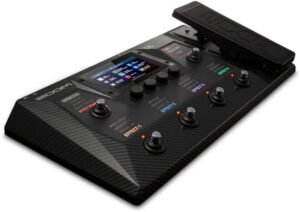
However, the V3 is not a conventional stompbox with built-in footswitches.
Musicians who want to control effects with their feet will need to consider Zoom’s compatible optional accessories.
Microphone connections and phantom power
The V3 uses a standard XLR microphone input.
This allows it to work with many conventional vocal microphones.
The unit also provides 48V phantom power, which is important for compatible condenser microphones requiring an external power supply.
Phantom power is activated using a switch on the rear of the processor.
It should only be enabled when the connected equipment requires and supports it.
For microphones that do not support phantom power, Zoom instructs users to leave the function switched off.
The microphone input has an adjustable gain control.
This allows the incoming signal level to be set appropriately before it passes through the vocal effects.
The V3 also includes separate left and right quarter-inch audio outputs.
These can be connected to suitable mixer, recorder or PA inputs.
For a mono setup, Zoom specifies using the left output.
The stereo arrangement provides additional flexibility for effects and monitoring when the surrounding equipment supports it.
However, the main outputs are unbalanced quarter-inch connections rather than balanced XLR line outputs.
That distinction may matter in larger live-sound installations where long cable runs are required.
A suitable direct-injection arrangement may be useful in some setups.
For a small rehearsal room or home-recording arrangement, the connections are relatively straightforward.
For professional stage use, it is sensible to plan the complete signal path before purchasing additional cables or accessories.
Recording and streaming through USB
The V3 is not limited to live performance.
It can also function as a two-input, two-output USB audio interface.
This allows the unit to connect to a computer and transfer audio for recording or streaming.
For a singer working on a home-recording project, that creates a convenient way to bring vocal processing into a digital setup.
The unit operates at a 44.1kHz sampling rate and supports 16-bit, 24-bit and 32-bit USB audio formats.
It uses a Micro-USB connection rather than the newer USB-C connector found on many current devices.
A suitable data-capable USB cable is required.
Windows users may need to install the dedicated Zoom driver, while Zoom’s manual states that a separate driver is not required for supported Mac and iOS/iPadOS connections.
Connecting to certain mobile devices also requires the appropriate adapter and external power arrangement.
These details are worth checking before assuming that every phone, tablet or computer will connect with an ordinary cable.
The V3’s USB functionality is useful for simple vocal-recording and streaming arrangements.
However, it is not a complete multi-input studio interface for recording an entire band.
It has one microphone input for vocal processing and does not provide the collection of independent microphone and instrument inputs found on larger recording interfaces.
A guitarist wanting to record vocals and guitar as separate sources may still need additional equipment.
For someone concentrating primarily on processed vocals, though, the integrated interface can simplify the setup.
Headphone monitoring and backing tracks
The Zoom V3 includes a stereo headphone connection with its own volume control.
This is useful when monitoring vocal effects during preparation, recording or quiet practice.
Instead of relying entirely on an external speaker system, a singer can listen directly through suitable headphones.
The unit also has a stereo auxiliary input.
This allows an external audio source, such as a compatible music player, to be connected for accompaniment.
For example, a singer could practise along with a prepared backing track while experimenting with harmonies and other effects.
This can be helpful when developing vocal arrangements at home.
It also makes the V3 useful for singers who want to practise with their usual microphone and a consistent vocal-processing setup.
However, the auxiliary input should not be confused with a second fully featured microphone or guitar-processing channel.
The V3 remains a dedicated vocal processor.
Its connections provide convenience for monitoring and accompaniment rather than replacing a complete mixing desk.
Power options and portability
The V3 offers several ways to supply power.
It can operate using four AA batteries, a compatible Zoom power adapter or suitable USB power.
Zoom specifies approximately 3.5 hours of continuous operation from alkaline AA batteries under its stated conditions.
That provides useful flexibility for short sessions or situations where a convenient mains outlet is unavailable.
However, battery life will vary with operating conditions and the type of batteries used.
A musician planning a lengthy performance should not assume that four AA batteries will necessarily last throughout the event.
A suitable external supply is generally a more dependable approach for regular stage or studio use.
The specified mains adapter is the Zoom AD-16, providing 9V DC power.
Buyers should check which accessories are included in the particular retailer package, because the standard manufacturer box contents do not list the mains adapter.
The V3 weighs approximately 590g without batteries.
Its compact dimensions make it reasonably easy to transport alongside microphones, cables and other musical equipment.
It also has a practical advantage over some floor-mounted units because it can be positioned on a desk or near the microphone.
For home musicians and performers who move between different venues, that portability is appealing.
Nevertheless, the required cabling, power supply and optional mounting equipment should be considered as part of the complete setup.
Optional footswitch and expression pedal
Although the V3 has no built-in footswitches, Zoom provides a control input for compatible accessories.
The optional Zoom FS01 footswitch can be used to switch the selected effect off.
This is useful for performers who want to alternate between a processed and unprocessed vocal effect without reaching for the unit.
For a singing guitarist, that may be particularly valuable.
A musician could prepare a harmony or other vocal effect for a specific passage, then use the footswitch to disable it afterwards.
Zoom also supports the FP02M expression pedal.
This allows the selected effect parameter to be adjusted using the foot, providing another degree of performance control.
However, these are optional accessories rather than equipment permanently built into the processor.
They also perform specific control functions.
The V3 does not offer the same extensive foot-operated layout as a large multi-switch vocal workstation.
For performers who only need occasional changes, the optional controls may be sufficient.
Musicians planning complex changes throughout a set should consider whether the available controls match their performance requirements.
The drawbacks
The Zoom V3 combines several worthwhile features, but its design also introduces limitations that deserve careful consideration.
The first is that harmony generation requires an understanding of musical keys.
The ability to create additional voices is one of the unit’s strongest attractions.
However, the harmonies are based on the key selected by the musician.
The processor does not automatically identify every chord being played on a guitar and continuously adjust its harmony choices to follow those chords.
For a song that remains comfortably within one key, this may not present much difficulty.
For music involving unusual chord movement, borrowed chords or changes of key, the harmony settings require more attention.
Incorrect settings can produce additional notes that do not fit the intended arrangement.
Even when the key is correct, a generated harmony may not always follow the musical direction that a human backing singer would choose.
A real harmony arrangement involves decisions about phrasing, voice leading and when to remain silent.
The V3 provides automatic voices, but the musician still needs to make those artistic decisions.
Someone hoping to obtain convincing backing harmonies without understanding the song’s musical structure may find the process less automatic than expected.
The artificial character of generated harmonies is another consideration.
Adding two voices to a single performance can create an impressive sense of width.
However, the additional voices are electronically generated from the original vocal.
They do not provide the individual timing, pronunciation and tonal variations of separate singers.
When heavily featured in an exposed arrangement, this electronic character may become noticeable.
That may be perfectly acceptable in pop, electronic music or deliberately processed performances.
For acoustic folk, traditional music or intimate solo singing, it may be less desirable.
The most natural results are likely to come from choosing suitable harmony intervals, keeping the added voices at an appropriate level and using them selectively.
It is worth listening carefully to whether the effect enhances the song or simply draws attention to the processing.
Pitch correction cannot replace good vocal technique.
The V3 can correct small pitch deviations and create deliberately processed vocal effects.
However, it must work with the pitch information supplied by the singer.
Very uncertain notes, abrupt changes, excessive breath noise and unusual vocal techniques can make correction less predictable.
Stronger settings can also introduce the obvious stepped-pitch sound associated with robotic vocal processing.
That can be an effective creative choice, but it is not always appropriate for a natural performance.
Singers who want transparent, studio-quality correction with detailed editing may prefer dedicated recording software.
The V3 is designed for convenient real-time operation rather than the extensive note-by-note editing available in specialist production applications.
The available effects are not completely independent or freely rearrangeable.
Zoom provides 16 main vocal effect types, which sounds like an extensive selection.
However, the processor is not designed to behave like a modular studio effects system.
The main voice effects are selected using their dedicated buttons, and the processing structure follows Zoom’s intended arrangement.
Compression, delay, reverb and Enhance can provide additional treatment, but users cannot build an unlimited number of independent effect chains.
For most singers, the available combinations should be sufficient for ordinary performance and practice.
Someone who wants several different distortion stages, multiple pitch processors and sophisticated routing options may find the V3 restrictive.
The straightforward design is an advantage for accessibility but a limitation for deep sound design.
It offers fewer detailed editing options than software-based vocal processing.
The V3 relies on accessible controls rather than extensive parameter pages.
That makes it approachable, but it also means the user does not have the same degree of adjustment available in a full digital audio workstation.
For example, the compression section provides convenient amount control rather than a comprehensive set of individually adjustable studio-compressor parameters.
The reverb and delay controls are similarly intended for practical operation.
Someone who wants to adjust every timing, filtering, envelope and modulation detail may be better served by dedicated plugins or a more advanced vocal processor.
The V3 is particularly suitable for musicians who value convenience over exhaustive editing.
The absence of built-in footswitches is significant for live performers.
Despite its suitability for stage use, the V3 does not have the familiar row of integrated footswitches found on many guitar and vocal floor processors.
Its principal controls are designed to be operated by hand.
This works well when the unit is mounted near the microphone or placed within reach.
However, a singer playing guitar may not want to remove a hand from the instrument during a performance.
The optional FS01 footswitch helps by allowing the selected effect to be switched off.
The optional FP02M expression pedal offers control over an effect parameter.
Nevertheless, these accessories add to the complete setup.
They also do not transform the V3 into a sophisticated multi-switch performance workstation.
A vocalist who needs frequent, precisely timed changes between several complex effect arrangements may find a purpose-built floor processor more convenient.
The V3 does not provide extensive preset navigation for complete song arrangements.
Its controls are designed around selecting and adjusting vocal treatments directly.
Individual effect adjustments can be retained, but this is not the same as having a large performance-oriented preset system that recalls every setting for dozens of songs through dedicated footswitches.
For someone performing a set with only occasional changes, this may not matter.
For a professional vocalist using dramatically different processing for every song, it can become inconvenient.
Preparing a performance requires thinking carefully about how the controls will be operated between songs and during musical passages.
The accessibility of the front panel does not automatically mean every complex live arrangement will be easy to manage.
The microphone input is more specialised than the connections on a general-purpose audio interface.
The V3 provides an XLR microphone input, auxiliary input and stereo outputs.
That is appropriate for its intended purpose.
However, it does not have the collection of independent microphone and instrument channels found on a full recording interface.
A singing guitarist who wants to record a vocal microphone and a separate guitar microphone simultaneously onto independent tracks may need additional equipment.
The same applies to musicians recording keyboards, bass guitars or other instruments alongside vocals.
The V3 is designed to process a vocal signal, not replace every input on a studio mixer.
Buyers should be clear about that distinction before making it the centre of a larger recording setup.
The main audio outputs are unbalanced.
The left and right quarter-inch connections are useful for connecting the processor to appropriate equipment.
However, they are not balanced XLR outputs.
In some professional stage arrangements, particularly where signals must travel over long cable runs, balanced connections are preferred for their resistance to interference.
That does not make the V3 unsuitable for live use.
It simply means the signal-routing arrangement deserves attention.
A suitable DI box or other audio-interface solution may be helpful, depending on the venue and connected equipment.
For smaller setups, the available outputs may be entirely adequate.
The Micro-USB connection feels less convenient beside newer equipment.
The V3 uses a Micro-USB port for its audio interface and related computer functions.
Many newer computers, tablets and mobile devices now favour USB-C connections.
That may mean carrying an additional cable or adapter.
The cable must also support data transfer rather than supplying power alone.
Windows users may need the appropriate Zoom driver, while some mobile connections require particular adapter and power arrangements.
This is manageable, but it is not always as straightforward as connecting two modern USB-C devices with a single cable.
Anyone planning to use the V3 frequently with a phone or tablet should check compatibility and connection requirements in advance.
Battery operation is convenient but relatively limited.
Four AA batteries provide a useful portable power option.
However, Zoom’s specified operating time of approximately 3.5 hours with alkaline batteries may not be sufficient for every rehearsal or performance.
Actual duration can vary.
For an extended event, relying exclusively on batteries introduces the risk of running out of power during use.
A compatible external power supply is a more dependable choice when mains electricity is available.
Buyers should also check whether the required adapter is included in the package they are purchasing.
The standard manufacturer contents do not list it among the included items.
The unit is not designed to provide complete hands-free operation without accessories.
This is worth separating from the general absence of built-in footswitches.
A singing guitarist may want to change harmony intervals, adjust delay intensity or select different creative effects during a performance.
The optional footswitch and expression pedal provide limited control over selected functions, but they do not replace every front-panel operation.
Some settings still require direct interaction with the processor.
For a singer who performs mainly with a microphone in hand, this may be relatively straightforward.
For someone playing an acoustic guitar while singing, it requires more planning.
A mic-stand mount can make the controls more accessible, but it is an additional accessory.
The V3 is best suited to performances where the vocal sound can be prepared in advance and adjusted occasionally rather than constantly altered throughout every song.
Creative vocal effects may have limited everyday use.
Robot, Telephone, Whistle, Child and other transformations can be entertaining and musically effective.
However, not every singer needs such dramatic sound changes.
A performer concentrating on natural acoustic music may spend most of the time using compression, harmony and a small amount of reverb.
The more unusual effects might rarely be selected.
That does not reduce their creative potential, but it is important to assess which features will actually be useful.
Buying a processor primarily because it has numerous effects can lead to disappointment if only a handful fit the musical style being performed.
The V3 is not a vocal looper or a complete multitrack recording station.
Some vocal effects processors include dedicated looping functions that allow singers to build entire arrangements by recording and overdubbing their voice.
The V3 focuses on real-time vocal processing and USB audio interface operation.
It should not be mistaken for a dedicated vocal loop station.
Likewise, although it can send audio to compatible recording software, it does not provide the independent tracks, arrangement tools and detailed editing environment of a complete recording system.
Musicians wanting to build layered vocal performances through live looping should look for equipment designed specifically around that function.
Those who want detailed studio production will still need appropriate recording software and, potentially, additional audio hardware.
Finally, the V3 cannot make every microphone or vocal performance sound professional automatically.
The microphone, room acoustics, gain settings, PA system and singer’s technique remain important.
Compression and Enhance can make a vocal more consistent and intelligible, but they cannot remove every acoustic problem.
Excessive gain can still cause distortion.
Poor microphone technique can still create unwanted changes in tone and level.
A difficult room can still cause feedback problems.
The V3 provides useful processing tools, but achieving a dependable sound requires attention to the entire signal chain.
For some musicians, a good microphone and carefully adjusted basic amplification may already provide everything necessary.
The Zoom V3 becomes particularly worthwhile when its additional harmonies, correction and creative effects serve a genuine musical purpose.
Who it suits best
The Zoom V3 Vocal Processor is particularly well suited to singers who want convenient access to vocal harmonies and effects without building an elaborate processing system.
Solo acoustic guitarists may appreciate being able to add occasional backing harmonies while continuing to perform independently.
Singers working in small bands can use the processor to introduce extra vocal textures without requiring additional musicians for every arrangement.
Home-recording musicians may find the USB audio interface useful when developing ideas, recording vocals or experimenting with creative effects.
It also has applications for podcasters and content creators who want deliberate character changes rather than simply a conventional clean microphone signal.
The straightforward controls should appeal to people who prefer physical equipment to computer-based effect editing.
However, the V3 is less suitable for musicians requiring advanced preset switching, dedicated live looping, extensive multitrack recording facilities or simultaneous processing of several independent instruments.
Its strongest appeal is to the performer who wants practical vocal enhancement and creative processing in a compact, accessible unit.
Is it worth the space in your music setup?
The Zoom V3 Vocal Processor offers a useful combination of vocal harmony generation, pitch correction and creative sound processing without requiring an extensive collection of equipment.
Its ability to add up to two harmony voices is a particularly appealing feature for solo singers and small-group performers.
The 16 creative vocal effects provide further options for shaping a performance, while compression, Enhance, reverb and delay address more conventional vocal-processing requirements.
The direct controls are a major part of the attraction.
Instead of navigating complicated menus, musicians can select effects and make adjustments using clearly labelled buttons and knobs.
The USB audio interface, headphone output and flexible power arrangements add further versatility.
There are meaningful compromises.
Harmony generation depends on choosing the appropriate musical key, pitch correction requires realistic expectations, and extensive hands-free control needs optional accessories.
The V3 is also not intended to replace a complete recording workstation or a sophisticated multi-switch vocal effects system.
Nevertheless, for someone who wants to explore additional vocal textures while maintaining a relatively straightforward setup, it is an interesting and capable processor.
The most important consideration is whether the harmonies, pitch processing and creative effects genuinely complement the music being performed.
For singing guitarists, small-band vocalists and home musicians who want greater control over their vocal sound, the Zoom V3 is well worth considering.
For more vocal processors, effects pedals and creative sound-shaping equipment, explore our Pedals & Effects guides.
As an Amazon Associate I earn from qualifying purchases.